.png)


Your Marketing at a Glance
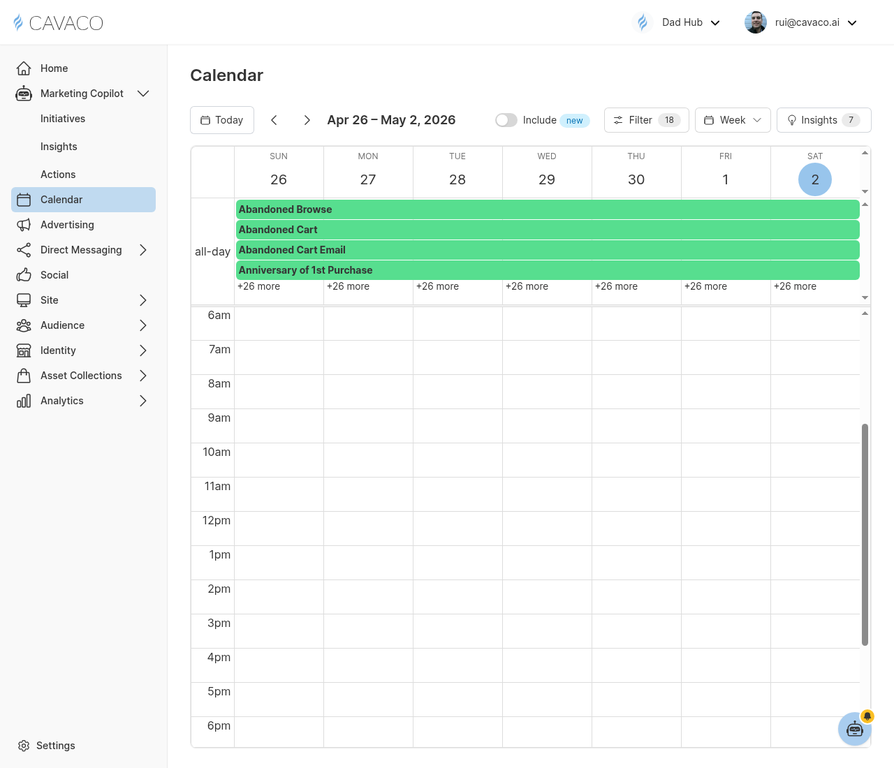
The Marketing Calendar is your bird's-eye view of all planned and active marketing activity. It consolidates email campaigns, SMS blasts, drip automations, advertising campaigns, and AI Copilot initiatives into a single, unified timeline — so you always know what is going out and when.
Accessing the Calendar
Click Calendar in the main navigation sidebar. The calendar defaults to a monthly view but can be switched to weekly or list view using the controls in the top right corner of the page.
Reading the Calendar
Each item on the calendar is color-coded by type so you can instantly distinguish between different marketing activities. Clicking on any calendar item opens its details and provides a direct link to edit or view the campaign.
Creating a Campaign from the Calendar
You can create a new campaign directly from the calendar by clicking on any date and selecting the campaign type. This is a fast way to plan your promotional calendar for the month without navigating away from your planning view.
Avoiding Campaign Conflicts
The calendar helps you spot potential conflicts — for example, scheduling an SMS blast on the same day as a drip campaign message might overwhelm your subscribers with too many messages in one day. Use the calendar view to space out your communications and ensure a consistent, non-intrusive cadence.
AI-Suggested Events
The Marketing Copilot proactively adds suggested campaigns to your calendar based on upcoming holidays, seasonal trends, and your store's historical performance data. These appear as suggested events that you can accept or dismiss with a single click directly from the calendar view.
.png)