.png)


What Is the AI Shopper Bot?
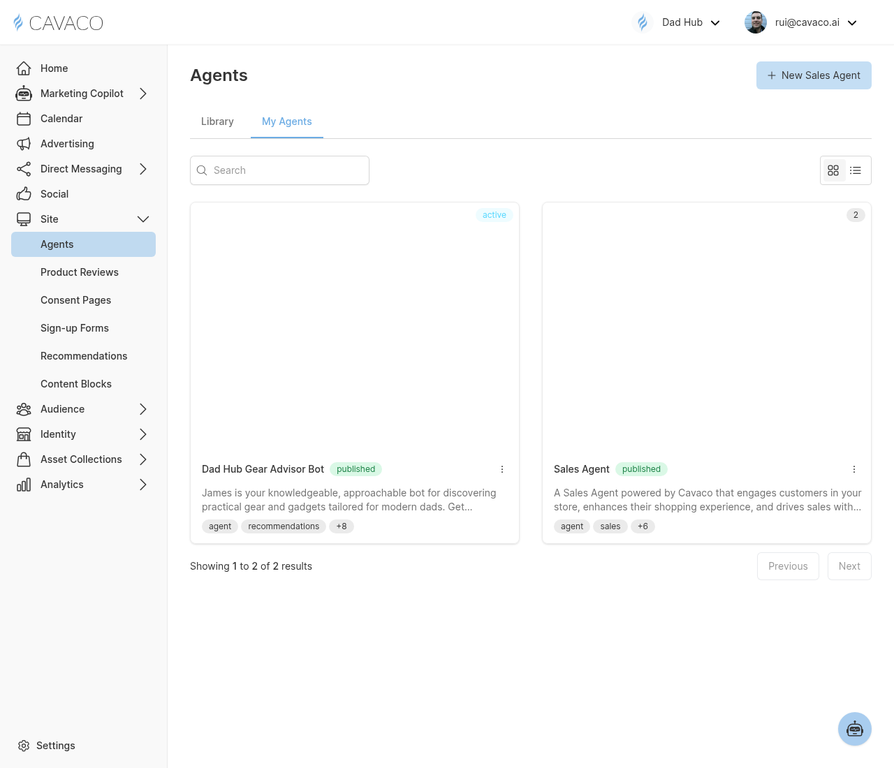
The AI Shopper Bot is a conversational AI assistant that you can deploy on your ecommerce store. It engages visitors in real time, answers product questions, helps shoppers find what they are looking for, and guides them toward purchase — all without any human intervention. The bot is trained on your product catalog and brand voice, so its responses are always accurate and on-brand.
Accessing the Shopper Bot
Navigate to Site > Agents in the main navigation to configure and manage your AI Shopper Bot.
Setting Up Your Shopper Bot
- Navigate to Site > Agents.
- Click Configure Bot to open the bot setup wizard.
- Give your bot a name and a brief persona description (e.g., "Hi, I'm Aria, your personal shopping assistant at [Store Name]").
- Connect your product catalog — Cavaco automatically syncs this from your connected ecommerce store.
- Configure the bot's appearance: choose the chat bubble position, color, and avatar.
- Set the bot's availability: you can configure it to be active 24/7 or only during specific hours.
What the Shopper Bot Can Do
Once deployed, the Shopper Bot can:
- Answer questions about specific products (ingredients, sizing, compatibility, availability)
- Help shoppers find products based on their needs ("I'm looking for a gift under $50 for a runner")
- Recommend complementary products to increase average order value
- Provide order status updates for existing customers
- Capture email and SMS opt-ins from engaged visitors
Reviewing Bot Conversations
All bot conversations are logged and accessible from Site > Agents. Regularly reviewing conversations helps you identify common questions that your product pages or FAQ could better address, and helps you improve the bot's responses over time.
Publishing the Bot to Your Store
Once configured, click Publish to deploy the bot to your store. If you connected your store via the native integration, the bot is deployed automatically. For custom storefronts, copy the provided embed code and add it to your store's global footer template.
.png)