.png)


The Complete Guide to Email Deliverability & IP Warm-Up
Email deliverability is the cornerstone of any successful email marketing strategy. If your emails don't reach inboxes, your beautifully designed campaigns and carefully crafted copy are wasted.
In this guide, we move beyond generic advice. Using real-world data from enterprise e-commerce audits, we will explore the hidden traps of email marketing—such as Apple Mail Privacy Protection (MPP) inflation and list degradation—and provide a concrete, step-by-step 6-week IP warm-up schedule to rebuild and guarantee high inbox placement.
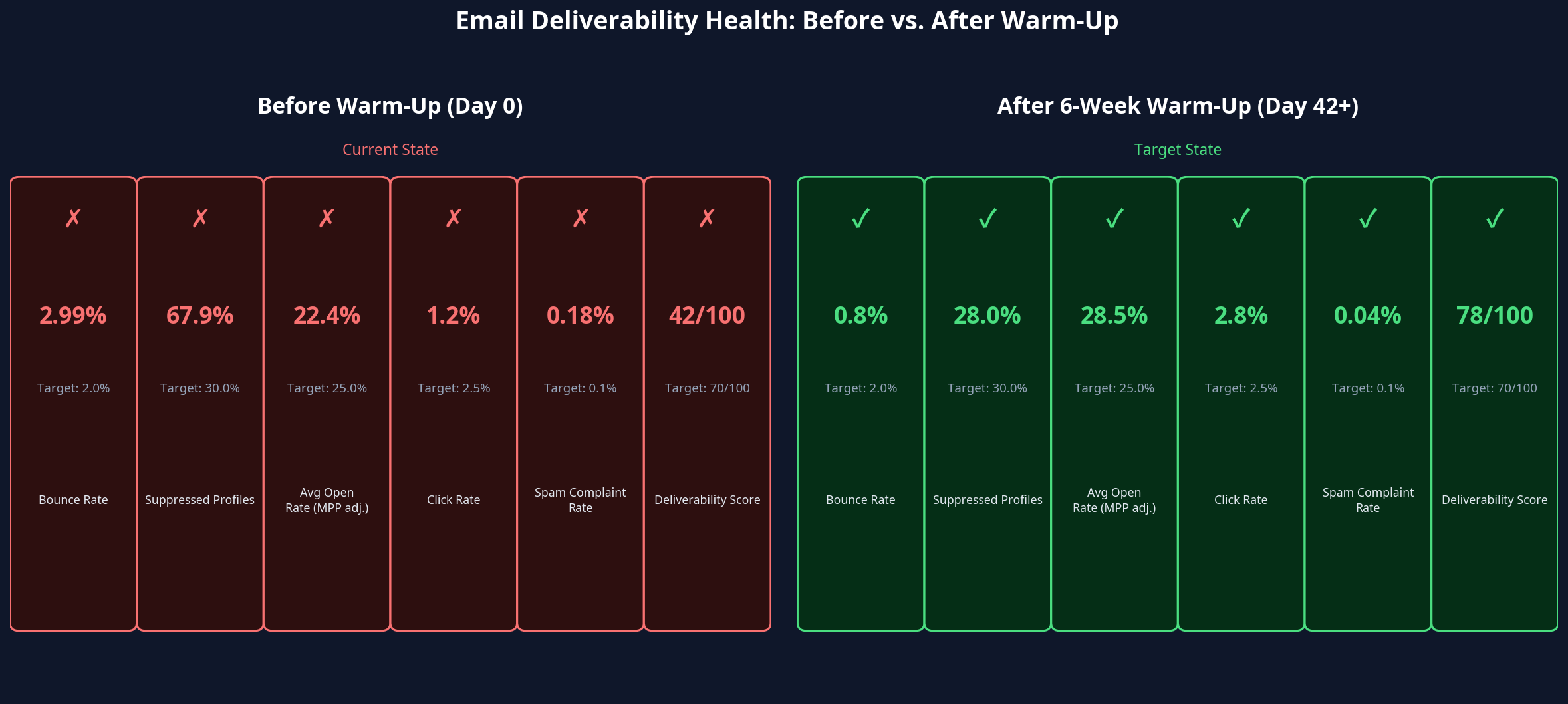
Expected deliverability health improvements after completing the 6-week warm-up protocol.
Guide Outline
- Diagnosing Deliverability Issues
- The Open Rate Illusion: Understanding Apple MPP
- Pre-Warm-Up Requirements
- The 6-Week IP Warm-Up Schedule
- Monitoring Cadence and Failure Protocols
- Post-Warm-Up: Maintaining the Score
1. Diagnosing Deliverability Issues
Poor deliverability is rarely caused by a single issue. It is usually the result of compounding problems over time. For example, an account with a deliverability score of 42/100 (where the industry minimum for reliable inbox placement is 70) often exhibits the following root causes:
| Root Cause | Problematic Measurement | Healthy Threshold |
|---|---|---|
| Gsuite/Google Workspace bounce rate | 2.99% | Gmail threshold: 2.0% |
| Suppressed / unreachable profiles | 67.9% of total profiles | Industry healthy: <30% |
| No engagement-based suppression | Campaigns sent to full list | Best practice: engaged only |
| Irregular send cadence | 8 of 15 months had zero sends | Best practice: minimum 2×/month |
When these issues combine, a significant proportion of every campaign send lands in spam or promotions folders—meaning you are paying to send emails that most recipients will never see.
2. The Open Rate Illusion: Understanding Apple MPP
Since the release of iOS 15 in September 2021, Apple Mail Privacy Protection (MPP) has fundamentally changed how marketers must view open rates. Apple pre-fetches emails on behalf of users, triggering an "open" event before the recipient ever actually sees the message.
This artificially inflates open rates for any account with a significant number of Apple Mail users. If your dashboard shows an average open rate of 57.3%, you must dig deeper to find the genuine human engagement rate.
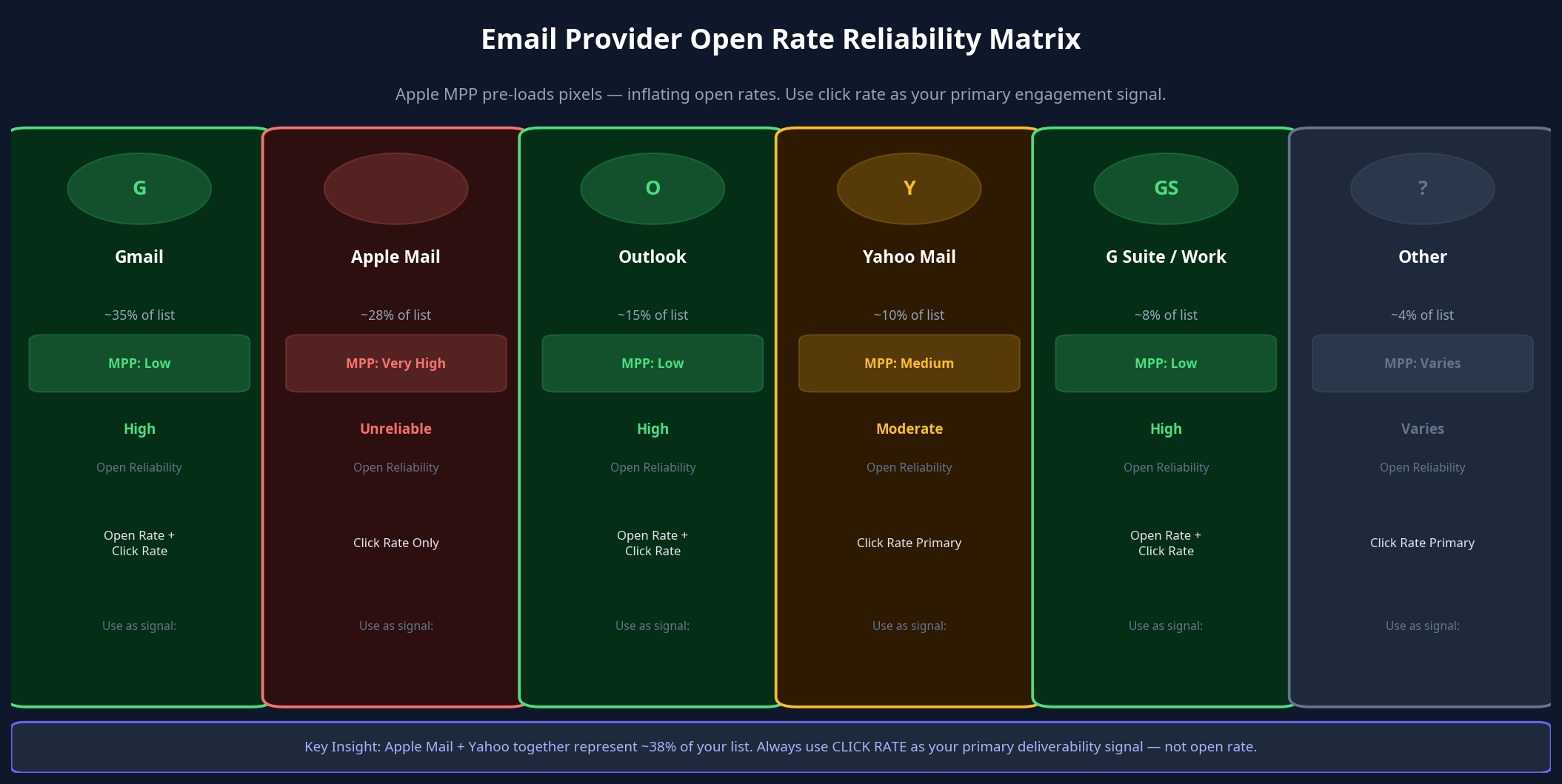
Apple Mail and Yahoo together represent ~38% of typical lists. Always use CLICK RATE as your primary deliverability signal.
How to Find Your True Open Rate
By breaking down open rates by inbox provider, you can isolate the MPP inflation. Use Gmail and Gsuite open rates as your most reliable proxies for genuine human engagement.
*Note: For warm-up purposes, use click rate as the primary engagement signal, not open rate.*
3. Pre-Warm-Up Requirements
Before beginning any IP warm-up protocol, you must complete these mandatory prerequisites. The warm-up protocol will fail if these are not in place.
- Authentication (SPF, DKIM, DMARC): Gmail and Yahoo's 2024 bulk sender requirements made these mandatory for any sender dispatching more than 5,000 emails per day [1]. Non-compliance results in automatic rejection or spam placement regardless of list quality.
- SPF: Verify that your SPF record includes Cavaco AI's sending servers.
- DKIM: Confirm that DKIM signing is configured for Cavaco's sending domain.
- DMARC: Start at
p=quarantine(notp=reject— too aggressive for a domain with deliverability issues). - One-click unsubscribe: Ensure RFC 8058 one-click unsubscribe headers are active.
- Branded Sending Subdomain: Configure a dedicated sending subdomain (e.g.,
mail.yourdomain.com) in Cavaco's sending domain settings. This isolates email sender reputation from the root domain. - Google Postmaster Tools Registration: Register your domain at postmaster.google.com. This provides a real-time dashboard of Gmail-specific reputation data.
4. The 6-Week IP Warm-Up Schedule
A common point of confusion is how to structure campaigns as you add new segments each week. The correct model is: create one separate campaign per segment — do not add new segments to an existing campaign.
For example, if you warm up 6 segments over 6 weeks, you end up with 6 campaigns. Each campaign targets a single RFM segment (mutually exclusive — no contact appears in more than one warmup campaign), and each campaign contains the full sequence of emails for its segment's warmup duration.
Start by creating the Champions campaign. When Week 2 arrives, duplicate that campaign, change the audience to "Loyal Customers", and adjust the send volume. Repeat for each subsequent segment.
This warm-up protocol is the structured process for reversing deliverability problems simultaneously. It cannot be rushed. The expected outcome is a deliverability score of 70–85/100 by Day 90, with meaningful revenue impact beginning within the first 30 days.

Daily send volume ramps progressively — advance only when click rate threshold is met.
The Critical Rule
If the click rate drops below the pass/fail threshold at any week, do not advance to the next volume tier. Hold at the current volume for an additional week, investigate the content, and retest before advancing. Advancing too quickly is the most common warm-up failure mode.
Week 1 — Champions Only (Days 1–7)
ISPs evaluate the first sends from a warming domain with heightened scrutiny. Starting with your most valuable and engaged audience builds the strongest possible positive reputation signal. Use your highest-engagement content (e.g., a product recommendation email featuring top bestsellers), a personal tone, and one clear CTA. Minimal image weight is preferred.
Week 2 — Loyal Customers Added (Days 8–14)
Expand the audience to include contacts who consistently engage and demonstrate high loyalty, but are not yet at Champion tier. Introduce a second email type alongside the product recommendation send, such as a community or educational newsletter.
Week 3 — Potential Loyalists Added (Days 15–21)
Include contacts who exhibit characteristics of becoming loyal long-term buyers. Expect click rates to drop slightly from Week 2. Introduce a third email type: a re-engagement or "here's what's new" email specifically for this cohort. By Week 3, Google Postmaster Tools should show a clear upward trend in Domain Reputation.
Week 4 — One-Time Buyers Added (Days 22–28)
This is the first week where send volume approaches a meaningful scale for revenue impact. This is also the week where draft flows should be activated—staggered by 2-3 days between each activation. Start with Post-Purchase and Abandoned Cart flows.
Week 5 — Repeat Customers + Need Attention (Days 29–35)
The "Need Attention" segment is the first genuinely "at risk" cohort in the warm-up. These contacts require strategic re-engagement. Use re-engagement content with a strong incentive: free shipping, a discount, or early access to a new product.
Week 6 — Full Active List (Days 36–42)
This is the first full-scale campaign send since the warm-up began. Ramp gradually across the week. It should be your best content — a major product launch, a seasonal promotion, or a newsletter with personalized product recommendations embedded for each recipient.
*Note: The "Never Purchased" segment should be excluded from the 6-week warm-up entirely and handled with extreme care later.*
5. Monitoring Cadence and Failure Protocols
Daily Checks (Every Send Day)
- Spam complaint rate (Google Postmaster Tools): >0.10% — pause and investigate.
- Delivery errors (Google Postmaster Tools): Any spike — investigate immediately.
- Bounce rate (Cavaco Analytics): >1.5% — pause and investigate.
- Click rate (Cavaco Analytics): Below week threshold — hold, do not advance.
Failure Protocols — What to Do When Things Go Wrong
Scenario 1: Spam complaint rate exceeds 0.10%- Immediate action: Pause all sends for 24 hours. Do not advance to the next volume tier.
- Resolution: Identify which campaign or flow triggered the complaints. Suppress all complainants immediately. If caused by a specific segment, remove that segment from future sends until it completes a re-engagement sequence. Resume warm-up at the previous week's volume.
- Immediate action: Do not advance to the next volume tier. Hold at the current volume.
- Resolution: Run a content experiment using A/B testing (test subject lines and content formats). Once the click rate returns above the threshold for two consecutive sends, advance to the next tier.
- Immediate action: Pause the warm-up at the current volume. Do not expand.
- Resolution: Check spam complaint rates, authentication failures, and list validation results. Hold at the current volume for 1–2 additional weeks before the reputation recovers.
6. Post-Warm-Up: Maintaining the Score
Achieving 70–85/100 is the goal of the warm-up. Maintaining it requires permanent structural changes:
- Minimum send cadence: 2 campaigns per month to the active list. Automated marketing calendars and AI copilots can schedule these automatically, eliminating the risk of silences that degrade reputation.
- Engagement-based sending: Never revert to "batch-and-blast" full-list sends.
- Continuous list hygiene: Automatically suppress unengaged profiles and hard bounces.
References
[1] Google Postmaster Tools & Sender Guidelines: Requirements for Bulk Senders (2024-2025 Updates).
.png)