.png)


The Email Template Builder
Cavaco's email template builder lets you create beautiful, on-brand email designs without writing code. Templates are reusable — build them once and use them across multiple campaigns.
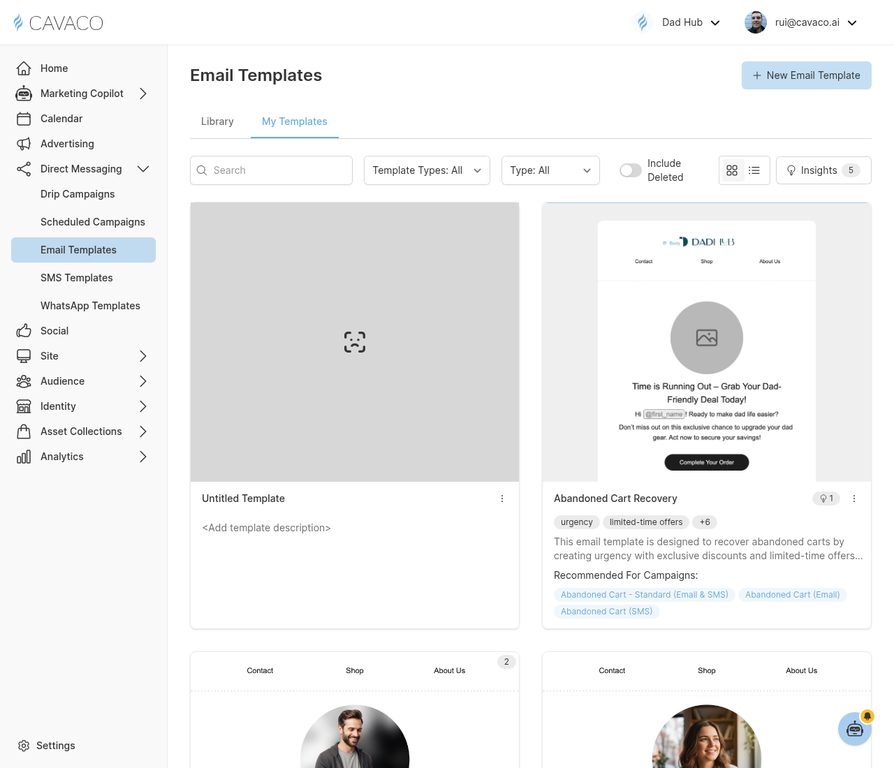
The Email Templates page shows all your saved templates ready to use in campaigns.
Creating a New Template
Navigate to Direct Messaging > Email Templates and click New Template. Start from a blank canvas or choose from Cavaco's pre-built template library. The drag-and-drop editor includes these block types:
- Text — Paragraphs, headings, and lists
- Image — Single or multi-column image layouts
- Button — CTA buttons with customizable styling
- Product — Dynamic product cards pulled from your catalog
- Divider — Visual separators between sections
- Social — Social media follow buttons
Dynamic Personalization
Use merge tags to personalize email content dynamically. Common variables include {first_name}, {last_order_date}, {recommended_products}, and {coupon_code}. Cavaco automatically populates these with real customer data at send time.
Testing Before Sending
Always send a test email before using a template in a live campaign. Click Send Test in the template editor to preview exactly how the email will appear in your inbox.
.png)